File > Open function does not 'see' package
Thread poster: Heinrich Pesch
Heinrich Pesch
Heinrich Pesch  Identity Verified
Finland
Local time: 15:07
Member (2003)
Finnish to German
+ ...
Jun 7, 2024

Since I started to use Trados 2021 I have this issue. To open a package I must double click on it in order to open it in the application. But when I export the translation the software 'sees' the original package. I wonder if this is a general issue with 2021 and if it is addressed in version 2022.

 
Roy Oestensen
Roy Oestensen  Identity Verified
Denmark
Local time: 14:07
Member (2010)
English to Norwegian (Bokmal)
+ ...
The problem is not quite clear. Jun 7, 2024

Isn't "the original package" the package you opened for the project?
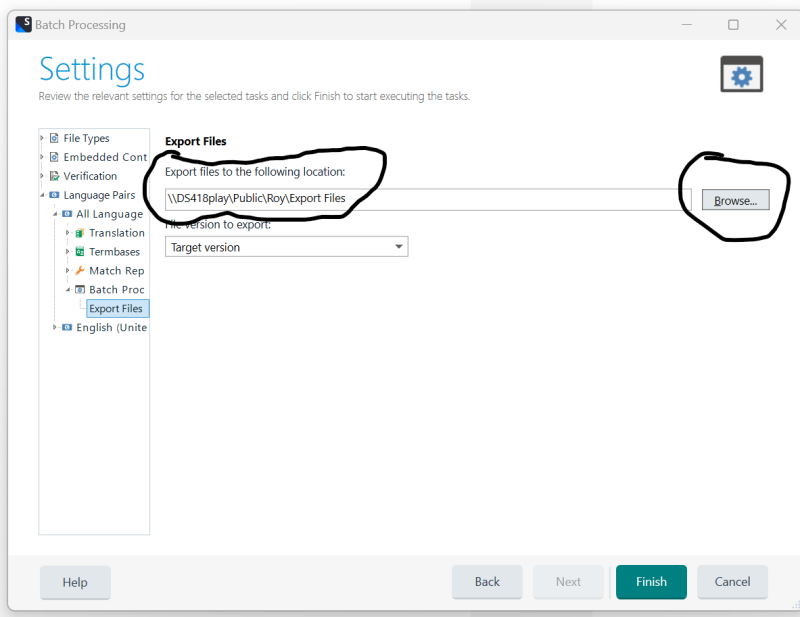
Anyway, you are supposed to be able to indicate for Studio where you want the exported files to go. In my case the standard folder is \\DS418play\Public\Roy\Export Files - where DS418play is my NAS.
When I right click the project I want to export, I choose Batch task > Export files and Next
In the next window, Files, I again click Next
Then I get the window Settings.
Here the export folder is indic
... See more
Isn't "the original package" the package you opened for the project?
Anyway, you are supposed to be able to indicate for Studio where you want the exported files to go. In my case the standard folder is \\DS418play\Public\Roy\Export Files - where DS418play is my NAS.
When I right click the project I want to export, I choose Batch task > Export files and Next
In the next window, Files, I again click Next
Then I get the window Settings.
Here the export folder is indicated. If I don't like the place, I click the Browse button and choose where I want the files to go.

Skjermbilde 2024-06-07 093916
▲ Collapse


Heinrich Pesch
Heinrich Pesch  Identity Verified
Finland
Local time: 15:07
Member (2003)
Finnish to German
+ ...
TOPIC STARTER
Open file function shows empty folder where actually my package is Jun 7, 2024

Only when I save the translated files into a package the function shows also the original package which I had to open by double click. This only happens in 2021.

 
Roy Oestensen
Roy Oestensen  Identity Verified
Denmark
Local time: 14:07
Member (2010)
English to Norwegian (Bokmal)
+ ...
Still unsure what the problem is Jun 7, 2024

I may still misunderstand. The original package would have the extension sdlppx. It would naturally not be shown when you create a return package with the extension sdlrpx, since Studio then only will show files with sdlrpx as the extension. But again,I probably still misunderstand your issue. Regardless, I am always telling Studio where I want the return package to be placed so that I have full control and can easily find it afterwards.

 
Heinrich Pesch
Heinrich Pesch  Identity Verified
Finland
Local time: 15:07
Member (2003)
Finnish to German
+ ...
TOPIC STARTER
Open package function Jun 7, 2024

In any normal application when you open a file, it shows the files in the folder. In Trados 2017 the function open package shows me the packages that are in any selected folder. In my 2021 Open package show an empty folder where I have saved the package from download. Is that not strange?
When saving a package the original package file is exposed. Only Open package function does not show it. I would like to know is this happens in all Trados 2021 applications.


Heinrich Pesch
Heinrich Pesch  Identity Verified
Finland
Local time: 15:07
Member (2003)
Finnish to German
+ ...
TOPIC STARTER
Open Worldserver package works Jun 7, 2024

I realise now I can use the Open Worldserver package instead of the Open package function.

kd42


To report site rules violations or get help, contact a site moderator:


You can also contact site staff by submitting a support request »

File > Open function does not 'see' package


Trados Business Manager Lite
Create customer quotes and invoices from within Trados Studio

Trados Business Manager Lite helps to simplify and speed up some of the daily tasks, such as invoicing and reporting, associated with running your freelance translation business.

More info »
CafeTran Espresso
You've never met a CAT tool this clever!

Translate faster & easier, using a sophisticated CAT tool built by a translator / developer. Accept jobs from clients who use Trados, MemoQ, Wordfast & major CAT tools. Download and start using CafeTran Espresso -- for free

Buy now! »