ProZ.com frequently asked questions
General
Questions in this category
- 1 - What is ProZ.com?
- 2 - How is ProZ.com pronounced?
- 3 - Who should I contact if I need help with completing my profile or using the site?
- 4 - What are ProZ.com glossaries? How many glossaries are there on the site?
- 5 - My country is not listed on the site, or is not listed correctly.
- 6 - Can I customize my homepage?
- 7 - Can I link to ProZ.com from my website?
- 8 - How can I contact ProZ.com staff?
- 9 - I am having issues with the site. How can I identify the source?
- 10 - How can I clear my browser's cache?
- 11 - How do I obtain a screenshot of the page I am viewing and attach it to a support request?
- 12 - How can I get the complete headers of an email message?
- 13 - How is the randomness of the featured translator determined?
- 14 - What are ad-hominem statements and why are they forbidden by site general rule #2?
- 15 - I have a complaint about a rules enforcement or other action taken by moderators or staff, where can I register this?
- 16 - Is interaction among friends, family or close associates allowed at ProZ.com?
- 17 - How can I post my comments on the Testimonials page?
- 18 - Localization and character sets
- 18.1 - I am viewing the site in a language I cannot understand. What happened?
- 18.2 - What character sets (Cyrillic, etc.) can I use throughout the site?
- 18.3 - Site text is not displaying correctly in my language. What should I do?
- 18.4 - The localization in my language is inconsistent and/or I think there is an error in the localization of the site into my language(s). What can I do?
- 18.5 - How does ProZ.com handle character sets?
- 18.6 - How can I set the character encoding used by my browser?
- 18.7 - What is Unicode?
- 18.8 - Why should I use Unicode?
- 18.9 - This text is in Unicode, why is it showing up as question marks or missing character symbols?
- 18.10 - I am unable to sign in, and my username or password contains non-ASCII characters.
- 18.11 - My name appears garbled in some parts of the site. How can I correct it?
- 18.12 - My data appears garbled in some parts of the site. How can I fix this?
- 18.13 - What are these checkmark and arrow icons appearing by text throughout the site?
- 19 - Localization (L10n)
- 19.1 - What is the ProZ.com localization effort?
- 19.2 - Where can I find the localization page?
- 19.3 - I would like to help localize ProZ.com into my native language. What should I do?
- 19.4 - How are the members of the localization team selected?
- 19.5 - How are localization teams organized?
- 19.6 - Do localization team members receive recognition?
- 19.7 - How can I change the language in which I view the site?
- 19.8 - The localized version of the site differs in meaning from the English version. Which should I observe?
- 20 - Date and time
- 21 - Languages
- 22 - Why does Internet Explorer say There is a problem with this website's security certificate?
1 - What is ProZ.com?
2 - How is ProZ.com pronounced?
3 - Who should I contact if I need help with completing my profile or using the site?
Moreover, you can watch this video tutorial, see if you can apply this to your profile, and then contact the support team so that they have a good look at your profile and suggest any further additions or improvements.
You can also reach support staff by clicking on Submit a support request in the Support Center page.
4 - What are ProZ.com glossaries? How many glossaries are there on the site?
- Personal glossaries: these are individual glossaries created by site users.
- Public glossaries: a list of individual glossaries created by all site users.
- The KudoZ open glossary: a glossary of terms translated via the KudoZ term help network.
- The GBK glossary: glossaries created from glossary-building KudoZ (GBK) questions.
See also:
GlossPost is a specialized discussion group for the dissemination of glossary, dictionary and terminology database URLs among translators.
When a user asks a KudoZ question, and after it has been graded, the user has the option of adding the KudoZ question to the KudoZ glossary and their personal glossary. Once the term is entered in the KudoZ glossary, it can be searched by various KudoZ search functions, i.e. KudoZ search, KudoZ glossaries, and search glossaries under the KudoZ menu bar. Once the KudoZ term has been entered in your personal glossary, that term has become part of your personal glossary, not your KudoZ glossary. Personal glossaries may be uploaded and/or entered by you in order to build your term base by clicking on the "edit terms" link on the left side of your profile page. If you would like to delete/rename a glossary, click on the My Glossary link under the My ProZ.com menu bar.
5 - My country is not listed on the site, or is not listed correctly.
6 - Can I customize my homepage?
Yes. There are several areas of the homepage which you can customize to suit your preferences, including the forums, jobs and KudoZ questions shown.
- KudoZ: click on the Customize link for the KudoZ box on your homepage and follow the steps there, or go directly to www.proz.com/kudoz and enter the pairs or other criteria you wish to filter your questions by and click on View questions (and save settings). Note that to show multiple language pairs, these should be language pairs you have already added to your profile. If you need to add a language pair to your profile, you can do so in your Profile updater.
- Jobs: click on the Customize link for the Jobs box on your homepage and follow the steps there, or go directly to www.proz.com/language-jobs and enter the pairs or other criteria you wish to filter your jobs by and click on Search jobs (and save settings). Note that to show multiple language pairs, these should be language pairs you have already added to your profile. If you need to add a language pair to your profile, you can do so in your Profile updater.
- Forums: click on the Customize link for the Forums box on your homepage and follow the steps there to select which forums and postings will appear on your homepage. Remember that if you have selected many forums for your homepage, it is possible that not all posts will be shown.
7 - Can I link to ProZ.com from my website?
Please note that when linking to ProZ.com, we ask that you not show ProZ.com pages embedded within the frames of your own site.
8 - How can I contact ProZ.com staff?
Please note that most system messages come from [email protected]. This is not a valid address, and any replies are automatically deleted. Please submit a support request instead.
8.1 - Where can I see my past support requests?
9 - I am having issues with the site. How can I identify the source?
The troubleshooting steps described here can help you test issues with ProZ.com, as well as most other websites.
- Try a different browser, for example, Chrome instead of Opera.
- Try a different device, for example, your cellphone instead of your computer.
- Try a different network, for example, your mobile network instead of your home's Internet service.
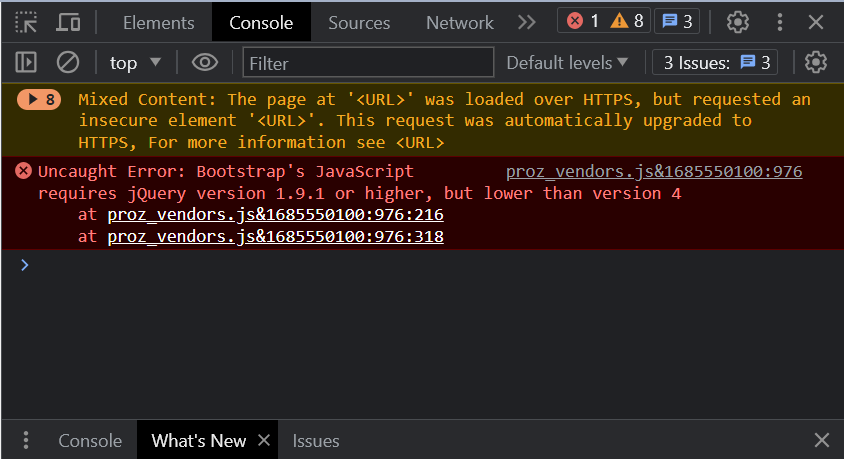
You may also be able to identify the issue using your browser's developer console.
You should be able to open the console by right-clicking the page, using the "Inspect" option and heading to the "Console" tab; by pressing F12 or Ctrl+Shift+J, or by searching within your browser's main menu.
Once you have the console open, load the page that's causing you trouble, and try the action again. Any errors during page load or command execution should be displayed in the console.
This is roughly the console looks like:
9.1 - Possible solutions to issues with your browser:
If changing your browser works, try the following possible solutions:
- Certain forms or pages may require cookies, so make sure that cookies are enabled. If they aren't, enable them, then close and re-open your browser, and try again.
- Clear your caché and cookies. After you've wiped your navigation data, close and re-open your browser, and try again.
- Make sure your in-browser ad-block isn't preventing the page from fully loading. You can do this by disabling it momentarily, or whitelisting the website's domain.
- Uninstall and re-install your browser completely. In certain cases, a problem during installation may cause long-term glitches that may not be solved otherwise.
9.2 - Possible solutions to issues with your device:
If changing your device works, but changing browsers within the same device doesn't, try the following possible solutions:
- A firewall, anti-malware or anti-virus software may be incorrectly blocking some function of the site. Try whitelisting the website domain.
- A virus or other kind of malware may be affecting your device's function. Try running a complete virus and malware scan.
- A software update or error during installation may have caused registry issues in your operating system. Depending on which OS you use, you can try your device's registry cleanup tool, or take it to a professional for revision.
9.3 - Possible solutions to issues with your network:
If changing your network works, it's most likely an issue with your Internet Service Provider. You may need to contact them, or utilize a VPN service to bypass local ISP restrictions.
10 - How can I clear my browser's cache?
To override your browser's cache, try reloading a web page by pressing F5 or clicking Refresh or Reload. If that does not work, try clearing your cache by following the instructions on this third party guide.
If you continue to have problems that appear to be caused by caching, you may need to edit the cache settings in your browser. See this third party guide for more information about editing your browser's cache settings.
11 - How do I obtain a screenshot of the page I am viewing and attach it to a support request?
Then, open Paint application (Start > Programs > Accessories > Paint) and select Paste from the Edit option in the top menu. This will paste the image copied in the previous step in the Paint file. Finally, save the file as .jpg in your computer and attach it to your support request by clicking on Browse in the Attachment section of the request and searching the file in your computer file system. Once that the file has been attached and all other fields in the support request have been completed (Category, Subject and Description ), click on Submit.
12 - How can I get the complete headers of an email message?
13 - How is the randomness of the featured translator determined?
Specifically, the display frequency is compared to the average number of times a translator has been featured, if a randomly selected profile has been featured more than twice the average, then another profile will be selected until one meets the criteria.
14 - What are ad-hominem statements and why are they forbidden by site general rule #2?
The reason that ad-hominem arguments are not allowed is that they tend, at least in ProZ.com forums, to degeneration in discourse. Since the solution to translation-related problems or issues do not tend to require an ad-hominem statement, this restriction against them does not detract from the purposes of the forums. On the contrary, disallowing ad-hominem remarks has the effect of refocusing attention on the issues.
15 - I have a complaint about a rules enforcement or other action taken by moderators or staff, where can I register this?
16 - Is interaction among friends, family or close associates allowed at ProZ.com?
In cases where there is evidence to suspect unfair interaction, site staff will enforce general site rule #2 accordingly to ensure fairness.
17 - How can I post my comments on the Testimonials page?
18 - Localization and character sets
18.1 - I am viewing the site in a language I cannot understand. What happened?

You can find all the available languages for localization and change your settings in this page.
18.2 - What character sets (Cyrillic, etc.) can I use throughout the site?
Translators may have problems viewing certain character sets on the site. These problems are not specific to ProZ.com, and need to be corrected at the browser/operating system level. Exactly how to do this varies, but usually requires manually specifying the character set to display the page in using a Character Set or Character Coding menu in the browser, or installing the needed character set at the browser or operating system level. Please consult your local documentation for further details.
Questions regarding displaying different character sets often come up in the ProZ.com Forums, so you may wish to browse the archives for helpful hints. Always check the archives first before asking a question, because there is a good chance it has been asked before.
18.3 - Site text is not displaying correctly in my language. What should I do?
If the issue persists, please submit a support request and specify what encoding option is selected in your browser so that site staff can look into the issue further.
18.4 - The localization in my language is inconsistent and/or I think there is an error in the localization of the site into my language(s). What can I do?
18.5 - How does ProZ.com handle character sets?
To alleviate this problem ProZ.com began a policy to migrate the site to using Unicode as a standard character encoding for the entire site. Starting in February 2006 parts of the site began being converted to using Unicode and converting older data into working Unicode text.
18.6 - How can I set the character encoding used by my browser?
18.7 - What is Unicode?
When text is entered into and stored on a computer it is stored in binary like all data on a computer is stored. A character set is essentially a table that tells the computer how the binary version of the text turns into actual characters on the screen. Most character sets only have room for a maximum of 255 characters, so originally each language family would have its own character set that mapped the stored data into the characters of that language's alphabet or symbols.
Because character sets were specific to languages that shared the same symbols, and there were often more than one character set for any given language, exchanging text between computers became increasingly difficult as the internet and international exchanges became more widespread.
To solve this problem the Unicode character set was created. The intent of Unicode is to offer a single character set that contains a way of representing all characters from as many languages as possible. For most people the technical details are not important, the important thing is that with Unicode it is possible to display almost any character on the same page or document without having to worry about which character set needs to be used.
18.8 - Why should I use Unicode?
Here are just a few of the possible texts that can all be displayed at once using unicode:
Arabic - يونِكود
Cyrillic - Юникод
Greek - Γιούνικοντ
Chinese - 统一码
Hebrew - יוניקוד
Japanese - ユニコード
Devanagari - यूनिकोड
18.9 - This text is in Unicode, why is it showing up as question marks or missing character symbols?
The first is that while Unicode is a character set that tells your computer which characters to display your computer still needs a font to determine what these characters actually look like. Most modern computers come with all the Unicode fonts for the most widely used languages, but there are some that need their own font to be added.
Fonts for some of the lesser used scripts in Unicode can be found in this third party source.
The other reason this text might be garbled is that it is not truly Unicode. When a modern browser receives non-Unicode text when it is expecting Unicode it will try its best to turn that text into Unicode, but depending on the original character set of the text this might not be possible. What results is a text that uses the Unicode character set that because it was translated incorrectly no longer holds any meaning.
18.10 - I am unable to sign in, and my username or password contains non-ASCII characters.
If you know the encoding in which your username and password are stored, visit the non-Unicode login page, set your browser to use the correct encoding, and sign in. (See this FAQ to learn how to set the character encoding in your browser.)
If you do not know the original encoding of your username and password, or if you still have trouble signing in, you can change your username and password to use Unicode characters by following the instructions on this page.
18.11 - My name appears garbled in some parts of the site. How can I correct it?
18.12 - My data appears garbled in some parts of the site. How can I fix this?
18.13 - What are these checkmark and arrow icons appearing by text throughout the site?
 and
 buttons allow viewers to tell the system whether it converted the data correctly.
If the text preceding the buttons appears garbled, please click on the
icon to help the system determine the correct conversion of the data.If the text is displayed correctly, click on the
icon to tell the system that it guessed correctly.19 - Localization (L10n)
19.1 - What is the ProZ.com localization effort?
19.2 - Where can I find the localization page?
19.3 - I would like to help localize ProZ.com into my native language. What should I do?
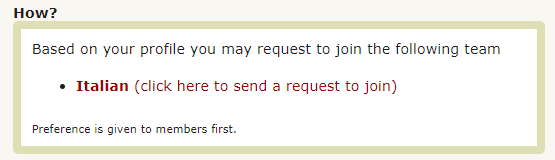
19.4 - How are the members of the localization team selected?
Preference is given to localization volunteers who are members of the site, as membership at ProZ.com represents a certain level of dedication to the site which is considered an important aspect of the criteria, and also allows a localization team member to better understand and help fellow members with features which may not be available to non-paying site users. Another key factor is the candidate's profile.
The more complete the profile the better. Some of the factors taken into account are: profile completion, participation on the site, credentials reported (and verified by site staff), KudoZ participation, etc. Participation in the ProZ.com Certified PRO Network is also important.
19.5 - How are localization teams organized?
- A team can be comprised of a team leader and additional team members.
- A localization team can be comprised only of team members.
19.6 - Do localization team members receive recognition?
- For every word translated a team member will receive 3 Browniz points and for every word proofread 1. Every 7500 browniz (2500 words translated or 7500 words proofread), a team member will receive 2 months of membership that will be exchanged for the 7500 browniz earned through localization.
Note: in order to receive this compensation the words translated should have been proofread by the Team Leader or by the team members devoted to the proofreading task.
-Localizers will also receive promotion which consists of the following:
1. Recognition in their profiles. Once team members have localized over 1000 words the following message will appear on their profiles: This translator is helping to localize ProZ.com into {language} Note: this message does not appear if the team member has not localized at least 1000 words.
If the team member is inactive and has localized over 1000 words their profile will show the following message: This translator helped to localize ProZ.com into {language}
2. All team members (active and inactive) are listed, with photos and optional bios, on the localization team page for their language. Search engine optimized links will point to these localization team bios from most ProZ.com pages when viewed in that team's language.
3. Specifically, team volunteers may receive added compensation depending on whether their release dates have been met. However, all active team volunteers will receive a search engine optimized link to their profiles from the bottom of most ProZ.com pages when viewed in their language.
This promotion is significant, as it provides a substantial boost to the "page rank" of these translators' ProZ.com profiles in search engines, resulting in an increase in client traffic. (ProZ.com's main pages have the highest page ranks in the industry, and these are inherited by pages we link to.)
4. As an additional way to thank volunteers for their role in the localization of ProZ.com, they can add a sample of their translation in the Portfolio section of their profile, and also add a project description of their participation in the localization efforts, to which site staff will provide feedback.
Read this article on the benefits of helping to localize ProZ.com into your native language.
19.7 - How can I change the language in which I view the site?
You can find all the available languages for localization and change your settings in this page.
19.8 - The localized version of the site differs in meaning from the English version. Which should I observe?
20 - Date and time
20.1 - What time zone is used on ProZ.com?
To set your timezone, click on the time and date that is shown at the right corner of every page.
You can also head to your Profile updater, your contact details, then go to change your location. There, you will find a link to set your timezone preferences.
20.2 - How can I edit my date and time display preferences?
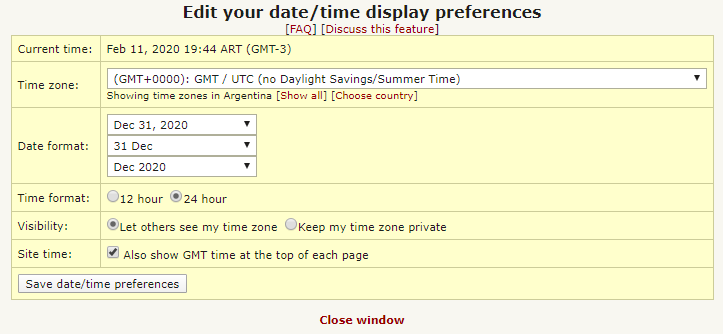
You can change the way dates and times appear to you on ProZ.com by adjusting your date and time display preferences. In addition to setting your time zone, you can specify whether you prefer to see times using a 12- or 24-hour clock, for example.
To edit your date and time preferences, click the time zone link in the current time that is shown at the top of each page. You can also edit this from the profile editor and various other places.
20.3 - Which time zone should I choose?
- If several time zones are listed for your country, choose the one with the GMT offset that matches your current time.
- If there is more than one time zone with your GMT offset, choose the time zone associated with the nearest large metropolitan city. Some attempt has been made to indicate the most common time zones in these cases.
- If you are in a jurisdiction with daylight savings time rules that are unusual for your area, you are likely already aware of this, and you should select the time zone that indicates this special region.
If you are still unsure which time zone to choose, please submit a support request.
20.4 - How is daylight savings time (DST) handled?
If you do not want to wait until the timezone database is updated with the new data for automatic DST changes, you can temporarily pick a different timezone with the correct GMT offset. To do so, go to your time/date preferences, underneath the drop-down list of timezones, and click Show all. Then select one of the other timezones labeled as yours. For example, if your timezone is GMT+5 and it changes to GMT+6 for DST, you can temporarily select a timezone that is GMT+6.
20.5 - What is GMT?
20.6 - What is a calendar entry (.ics) file?
21 - Languages
21.1 - How was the list of languages used throughout ProZ.com created?
21.2 - I would like a certain language added to the list. How can I request that?
21.3 - What about other changes?
22 - Why does Internet Explorer say There is a problem with this website's security certificate?
This happens because those versions of Internet Explorer don't understand the technology ProZ.com uses to serve secure SSL web pages. (ProZ.com switched to this technology, called SNI, in November 2014, to increase security for ProZ.com-hosted web applications).
You can resolve this issue by taking one of the following actions:
- If you use Internet Explorer version 6 or earlier, upgrade to a more recent version.
- If you use Windows 7 and see this warning in Internet Explorer, you may need to enable the TLS protocol. Go to Control Panel > Internet Options > Advanced, and under Security, tick the checkbox for each of the options labeled Use TLS {version}.
- If you use Windows XP or earlier, no version of Internet Explorer supports this secure site technology. You can use a different browser such as Chrome or Firefox to view the secure pages without warnings.
See this blog post at the Microsoft Developer Network for more details.