This site uses cookies.
Some of these cookies are essential to the operation of the site,
while others help to improve your experience by providing insights into how the site is being used.
For more information, please see the ProZ.com privacy policy.
VIA AILooking for an interpreter?
Remoto by ProZ.com connects you with an identity-verified interpreter by video or phone in about 60 seconds — 300+ languages, on demand or booked ahead.
Try Remoto »
Daniel Frisano Italy Local time: 19:27 Member (2008) English to Italian + ...
Jan 25, 2019
When I use Asul as font in certain languages, some letters are rendered in Cambria. Example:
The letters ě ů ž (among others) are turned to Cambria. Is there a way to keep everything in Asul?
Subject:
Comment:
The contents of this post will automatically be included in the ticket generated. Please add any additional comments or explanation (optional)
Samuel Murray Netherlands Local time: 19:27 Member (2006) English to Afrikaans + ...
Which program, which operating system?
Jan 25, 2019
Daniel Frisano wrote:
When I use Asul as font in certain languages, some letters are rendered in Cambria.
Which program, which operating system?
Subject:
Comment:
The contents of this post will automatically be included in the ticket generated. Please add any additional comments or explanation (optional)
Daniel Frisano Italy Local time: 19:27 Member (2008) English to Italian + ...
TOPIC STARTER
Jan 25, 2019
Samuel Murray wrote:
Which program, which operating system?
MS Word 2016, Windows 10.
Same thing happens in OpenOffice, Ubuntu.
Subject:
Comment:
The contents of this post will automatically be included in the ticket generated. Please add any additional comments or explanation (optional)
Samuel Murray Netherlands Local time: 19:27 Member (2006) English to Afrikaans + ...
Fallback
Jan 25, 2019
Daniel Frisano wrote:
When I use Asul as font in certain languages, some letters are rendered in Cambria. The letters ě ů ž (among others) are turned to Cambria. Is there a way to keep everything in Asul?
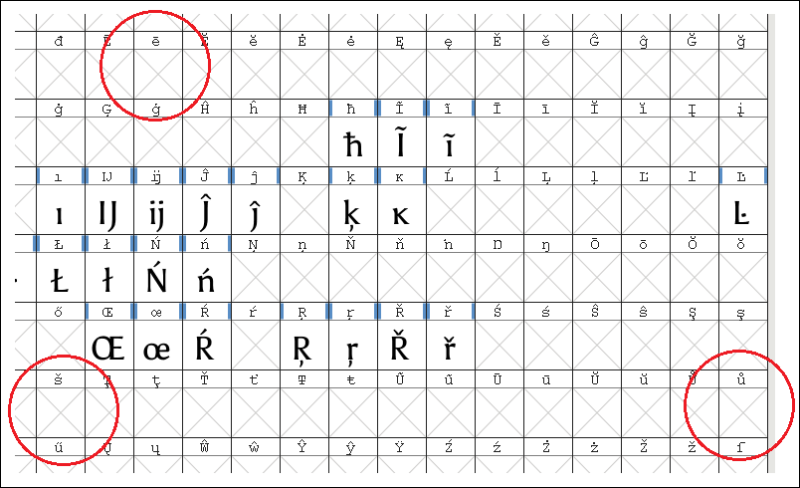
I downloaded a font named Asul and opened it in a font editor to see what characters are available in it. The three characters you're hoping to see, are not present in Asul. This means that your text editor can't display them in Asul. Different text editors do different things when this happens (some show only a small square or a question mark instead of the unknown character), but most word processors and browsers fall back to a default font, which in your case appears to be Cambria.
Fontforge (freeware) shows that the three characters you're looking for, do not have glyphs in Asul:
What you can do, is change the default font of your document to something more similar to Asul, so that the word processor falls back to that font.
==
How important is it to you to use Asul? You could always try to identify which characters are missing, and then create them in a font editor using copy/paste. It's not difficult, but font editors that output working fonts tend to be expensive (in the adjusted font that I created using the freeware FontForge, only ů works).
[Edited at 2019-01-25 17:11 GMT]
Subject:
Comment:
The contents of this post will automatically be included in the ticket generated. Please add any additional comments or explanation (optional)
Translation Office 3000 is an advanced accounting tool for freelance translators and small agencies. TO3000 easily and seamlessly integrates with the business life of professional freelance translators.
Check translations faster for consistency, quality and style guide compliance
PerfectIt helps professional translators deliver error-free documents in Microsoft Word and PowerPoint. It helps improve consistency, ensure quality, and enforce style guides. ProZ members receive a 30% discount off individual purchases of PerfectIt.