Tracked changes: formatted table Thread poster: Andrus Lauringson
|
|---|
Hello!
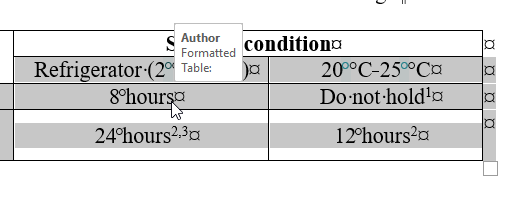
I am updating a Word file, based on client's tracked changes, and when I hover the mouse cursor over a table, it simply says: "Formatted Table:" but no other information.
How to find out what (if anything) was changed? I don't see any differences.
[Edited at 2025-12-20 01:55 GMT]
| | | | Samuel Murray 
Netherlands
Local time: 11:52
Member (2006)
English to Afrikaans
+ ...
| It might mean | Dec 20, 2025 |
Andrus Lauringson wrote:
I am updating a Word file, based on client's tracked changes, and when I hover the mouse cursor over a table, it simply says: "Formatted Table:" but no other information.
It might mean that the table's formatting was changed while tracked changes was enabled. So, no text was changed, but the formatting was changed. E.g. it used to be right-aligned and now it's left-aligned.
| | | | Stepan Konev
Russian Federation
Local time: 13:52
English to Russian
They seem to have added a nonbreaking space everywhere before °С. It would be correct if the target language was Russian for example. In English, as far as I know, there should be no white space or nbsp between the number and the °С.
What regards the editing/formatting tooltips, they show up because of your settings. If you want to change it, navigate to the Review tab, Tracking group of icons, Show markup, Balloons. Your current setting most probably is 'Show all revisions inl... See more They seem to have added a nonbreaking space everywhere before °С. It would be correct if the target language was Russian for example. In English, as far as I know, there should be no white space or nbsp between the number and the °С.
What regards the editing/formatting tooltips, they show up because of your settings. If you want to change it, navigate to the Review tab, Tracking group of icons, Show markup, Balloons. Your current setting most probably is 'Show all revisions inline'. It applies to all other edits either: e.g., if you hover over the green nonbreaking space character, you would see the edit tooltip.
You can change it to 'Show revisions in balloons' if you want to see the edits in the right-hand pane.
[Edited at 2025-12-21 12:18 GMT] ▲ Collapse
| | | | To report site rules violations or get help, contact a site moderator: You can also contact site staff by submitting a support request » Tracked changes: formatted table | CafeTran Espresso | You've never met a CAT tool this clever!
Translate faster & easier, using a sophisticated CAT tool built by a translator / developer.
Accept jobs from clients who use Trados, MemoQ, Wordfast & major CAT tools.
Download and start using CafeTran Espresso -- for free
Buy now! » |
| | Protemos translation business management system | Create your account in minutes, and start working! 3-month trial for agencies, and free for freelancers!
The system lets you keep client/vendor database, with contacts and rates, manage projects and assign jobs to vendors, issue invoices, track payments, store and manage project files, generate business reports on turnover profit per client/manager etc.
More info » |
|
| | | | X Sign in to your ProZ.com account... | | | | | |




 Login to reply/comment

