This site uses cookies.
Some of these cookies are essential to the operation of the site,
while others help to improve your experience by providing insights into how the site is being used.
For more information, please see the ProZ.com privacy policy.
VIA AILooking for an interpreter?
Remoto by ProZ.com connects you with an identity-verified interpreter by video or phone in about 60 seconds — 300+ languages, on demand or booked ahead.
Try Remoto »
Hello,
does anyone knows how to set the translated text colour in Passolo 2011 ? I.e. I want the text I type to appear in blue directly (For review).
[Edited at 2016-12-06 16:19 GMT]
Subject:
Comment:
The contents of this post will automatically be included in the ticket generated. Please add any additional comments or explanation (optional)
Platary (X) Local time: 04:48 German to French + ...
It should be automatic ?
Dec 7, 2016
Jean-Christophe Duc a écrit :
I want the text I type to appear in blue directly (For review).
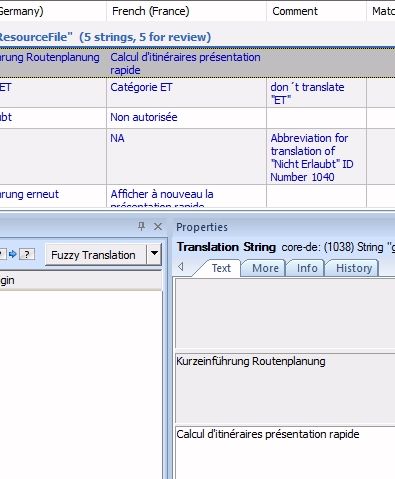
I'm not sure to understand. When you translate a string and press Enter to confirm the translation, the string for review is automatically in blue. No?
Here a partial screenshot :
Subject:
Comment:
The contents of this post will automatically be included in the ticket generated. Please add any additional comments or explanation (optional)
Create customer quotes and invoices from within Trados Studio
Trados Business Manager Lite helps to simplify and speed up some of the daily tasks, such as invoicing and reporting, associated with running your freelance translation business.
Check translations faster for consistency, quality and style guide compliance
PerfectIt helps professional translators deliver error-free documents in Microsoft Word and PowerPoint. It helps improve consistency, ensure quality, and enforce style guides. ProZ members receive a 30% discount off individual purchases of PerfectIt.