Problems with DeepL plug-in Thread poster: Christopher Kennedy
|
|---|
Since yesterday, I have been unable to use the DeepL plug-in with Trados Studio 2022 SR2.
From DeepL technical help, I know my account and key for this plug-in are up to date and correct.
Following their advice, I have made sure I have the latest version of the plug-in from the RWS App Store.
However, when I try to add "DeepL MT Translation Provider" to my TMs for a project, I now get the message "Authorization Failed. Please supply a valid API key".
As I say, Deep... See more Since yesterday, I have been unable to use the DeepL plug-in with Trados Studio 2022 SR2.
From DeepL technical help, I know my account and key for this plug-in are up to date and correct.
Following their advice, I have made sure I have the latest version of the plug-in from the RWS App Store.
However, when I try to add "DeepL MT Translation Provider" to my TMs for a project, I now get the message "Authorization Failed. Please supply a valid API key".
As I say, DeepL assure me that my key is valid.
I have been using this plug-in for over one year and it has never been a problem before.
Is anyone else experiencing a similar problem?
Can anyone suggest a cure?
Thanks
Chris Kennedy ▲ Collapse
| | | | Kristina Wolf 
Australia
Local time: 01:48
Spanish to German
+ ...
| Remove plugin and reinstall | Mar 24 |
That would be my first sugggestion.
Other than that I have found that ChatGPT is a pretty good IT consultant for most issues.
| | | | ibz
Local time: 15:48
English to German
+ ...
| Siontrans
Member (2014)
English to Greek
+ ...
| I have the same issue as well | Mar 26 |
I have the same issue as well. I’m not sure why, but when I toggled between the options “Quality optimized,” “Quality preferred,” and “Latency,” I was able to get it working on the “Latency” setting.
| | |
|
|
|
Christopher Kennedy
France
Local time: 15:48
Member (2007)
French to English
+ ...
TOPIC STARTER | Question to Siontrans | Mar 26 |
Thanks everybody for your replies.
Hi, Siontrans. Could you explain which options you are referring to and how to access them.
Thanks
| | | | Siontrans
Member (2014)
English to Greek
+ ...
I have SDL Studio 2024 and the latest DeepL plugin. On the page where you enter the API information, there is a dropdown menu on the left side with three options: “Quality optimized,” “Quality preferred,” and “Latency.” You may want to try toggling them. In my case, the “Quality optimized” option does not work; I assume it takes time to communicate with their server.
In SDL Studio 2022, I see that there is a dropdown menu with formality options: “Default,” “Les... See more I have SDL Studio 2024 and the latest DeepL plugin. On the page where you enter the API information, there is a dropdown menu on the left side with three options: “Quality optimized,” “Quality preferred,” and “Latency.” You may want to try toggling them. In my case, the “Quality optimized” option does not work; I assume it takes time to communicate with their server.
In SDL Studio 2022, I see that there is a dropdown menu with formality options: “Default,” “Less formal,” and “More formal.” You may also try toggling these. ▲ Collapse
| | | | Christopher Kennedy
France
Local time: 15:48
Member (2007)
French to English
+ ...
TOPIC STARTER | Follow on question regarding API information page | Mar 26 |
Hello again Siontrans,
Thanks for your continued help.
I am probably being really stupid, but I don't understand which page you mean by "On the page where you enter the API information"
Are you referring to a page in Studio? Could you give me the idiot's guide to which tabs to click to get there.
I can't find anything under Add-ins=>Plug-ins that resembles this. Or on the page which opens in project settings when I try to add the App to the TMs.
Thanks again ... See more Hello again Siontrans,
Thanks for your continued help.
I am probably being really stupid, but I don't understand which page you mean by "On the page where you enter the API information"
Are you referring to a page in Studio? Could you give me the idiot's guide to which tabs to click to get there.
I can't find anything under Add-ins=>Plug-ins that resembles this. Or on the page which opens in project settings when I try to add the App to the TMs.
Thanks again for your help. It is greatly appreciated. ▲ Collapse
| | | | Siontrans
Member (2014)
English to Greek
+ ...
| I’m not an expert either. | Mar 26 |
Hello Christopher,
In Studio, Project Settings > Memory and Automated Translation > Use MT DeepL Translation Provider, you may see the following screen,
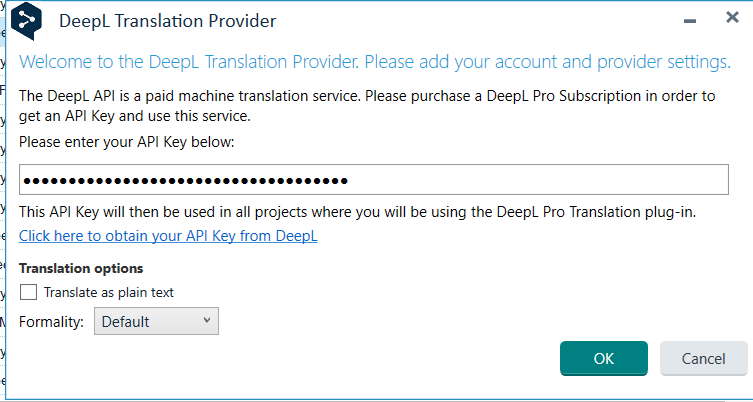
where you can choose the formality options in SDL Studio 2022: “Default,” “Less formal,” and “More formal.” You may want to try toggling these.
As far as I can see, in SDL Studio 2024 these options have been replaced with “Quality optimized,” “Quality preferred,” and “Latency.” Choosing “Latency” did the trick.
Regards.
| | |
|
|
|
Christopher Kennedy
France
Local time: 15:48
Member (2007)
French to English
+ ...
TOPIC STARTER
Firstly, thanks everyone for your help and suggestions.
I have now found a post with a solution which has worked for me; namely:
The DeepL plugin needs to be removed using the Plugin Installer directly.
The path to the Plugin Installer on my computer is the following: C:\Program Files (x86)\Trados\Plugin installer. You double click on the .exe file to open the window to uninstall your plugins. Then just reopen studio and reinstall the latest version of the ... See more Firstly, thanks everyone for your help and suggestions.
I have now found a post with a solution which has worked for me; namely:
The DeepL plugin needs to be removed using the Plugin Installer directly.
The path to the Plugin Installer on my computer is the following: C:\Program Files (x86)\Trados\Plugin installer. You double click on the .exe file to open the window to uninstall your plugins. Then just reopen studio and reinstall the latest version of the Plugin. ▲ Collapse
| | | | To report site rules violations or get help, contact a site moderator: You can also contact site staff by submitting a support request » Problems with DeepL plug-in | CafeTran Espresso | You've never met a CAT tool this clever!
Translate faster & easier, using a sophisticated CAT tool built by a translator / developer.
Accept jobs from clients who use Trados, MemoQ, Wordfast & major CAT tools.
Download and start using CafeTran Espresso -- for free
Buy now! » |
| | TM-Town | Manage your TMs and Terms ... and boost your translation business
Are you ready for something fresh in the industry? TM-Town is a unique new site for you -- the freelance translator -- to store, manage and share translation memories (TMs) and glossaries...and potentially meet new clients on the basis of your prior work.
More info » |
|
| | | | X Sign in to your ProZ.com account... | | | | | |






 Login to reply/comment
 Translation news related to SDL Trados

