Installing CafeTran on LinuxMint Thread poster: Susanne Döring
|
|---|
Susanne Döring 
Jordan
Local time: 10:14
Member (2017)
English to German
+ ...
I am changing from Windows to Linux. I downloaded the Linux version of CT, opened the file but cannot find the exe. file - what exactly is the name? I tried to double click cafetran.jar , but get a notice that the file cannot be executed as it might be unsafe.
I hope I can get advice here, probably it is very easy if one knows how to.
| | | | | There is no .exe file | Jun 1, 2025 |
On Linux, there are no .exe files. Given that CafeTran is a Java application, you need to run the .jar file. Right-click on it, go to Properties, then under the Permissions tab check the box next to "Allow executing file as program".
[Edited at 2025-06-01 14:49 GMT]
| | | | Novian Cahyadi (X)
Local time: 15:14
| Installing CT on Linux | Jun 1, 2025 |
Hi Susanne,
You typically don't download an .EXE file to install a program on Linux, much in the same way you don't run an .EXE file on a Mac.
You need the Linux version of CafeTran, which you can get here. There's also a guide to... See more Hi Susanne,
You typically don't download an .EXE file to install a program on Linux, much in the same way you don't run an .EXE file on a Mac.
You need the Linux version of CafeTran, which you can get here. There's also a guide to install it on Linux here.
[Edited at 2025-06-01 14:59 GMT] ▲ Collapse
| | | | Susanne Döring
Jordan
Local time: 10:14
Member (2017)
English to German
+ ...
TOPIC STARTER
Both answers are very helpful, thank you very much, I'm still completely new to Linux and have no one around who has experience.
| | |
|
|
|
| Trainer with hands-on experience on Linux | Jun 2, 2025 |
Susanne Döring wrote:
Both answers are very helpful, thank you very much, I'm still completely new to Linux and have no one around who has experience.
Piotr is an experienced user of Linux and offers training for CafeTran Espresso:
https://www.proz.com/translator/32111
By the way, he also creates advanced Python scripts for a better integration of AI into your CafeTran Espresso workflow.
[Edited at 2025-06-02 05:30 GMT]
| | | | | The executable file is named Cafetran :-) | Jun 2, 2025 |
CafeTran Trainer wrote:
Susanne Döring wrote:
Both answers are very helpful, thank you very much, I'm still completely new to Linux and have no one around who has experience.
Piotr is an experienced user of Linux and offers training for CafeTran Espresso:
https://www.proz.com/translator/32111
By the way, he also creates advanced Python scripts for a better integration of AI into your CafeTran Espresso workflow.
[Edited at 2025-06-02 05:30 GMT]
Hello Susanne and thanks for the referral Hans,
When you download CT for Linux, you can move the downloaded archive from the downlowad folder to a different folder or keep it there, whichever suits you, unpack it and then cd into the cafetran folder, or just open the cafetran folder in the terminal and then type:
./Cafetran
as shown, because case matters on linux, and press enter. You can create a desktop shortcut for that, but I do not know which distro you have. I am on MX linux, and I usuallyu start Cafetran from the terminal.
If you have any other questions, please get in touch.
| | | | Susanne Döring
Jordan
Local time: 10:14
Member (2017)
English to German
+ ...
TOPIC STARTER
Okay, thank you also both for your time and advice. I'll see how far I get and maybe come back to you. I'm still having some problems with the terminology, but I hope I'll find everything.
| | | | | Getting there | Jun 3, 2025 |
Susanne Döring wrote:
Okay, thank you also both for your time and advice. I'll see how far I get and maybe come back to you. I'm still having some problems with the terminology, but I hope I'll find everything.
I learned my ropes with Linux nearly twenty years ago when I bought a laptop without an operating system, as getting Windows at that time meant an added expense, and I put Linux on it. Some things in Linux you do differently, which does not mean it is better or worse, just different.
I made a comeback to Linux when I found out that the cheap Windows 10 devices just can't perform well with that system. Where Winddows 10 fails, MX Linux (my favourite distro these days) thrives.
[Edited at 2025-06-03 10:12 GMT]
| | |
|
|
|
Susanne Döring
Jordan
Local time: 10:14
Member (2017)
English to German
+ ...
TOPIC STARTER | Linux is faster | Jun 4, 2025 |
that is what I find out now. The laptop where I installed it was slow from the beginning, although new enough that theoretically I could have upgraded to Win11 - now, under Linux Mint it is as fast as I could wish.
I regret I did not learn more about Linux years ago, but as I was mostly using my Computers for work and all companies were using MS I had little motivation or time to look into it, unfortunately. Now I'm late to the party but I hope for the last years I'll need computers I'll b... See more that is what I find out now. The laptop where I installed it was slow from the beginning, although new enough that theoretically I could have upgraded to Win11 - now, under Linux Mint it is as fast as I could wish.
I regret I did not learn more about Linux years ago, but as I was mostly using my Computers for work and all companies were using MS I had little motivation or time to look into it, unfortunately. Now I'm late to the party but I hope for the last years I'll need computers I'll be able to manage - with help from nice people like you.
I'm still making lots of changes, slowly but surely - next to go is MS office, replaced by libre office. I'm already on the way to change my email providers, too - and everything where someone is trying to force AI on me. ▲ Collapse
| | | |
Piotr Bienkowski wrote:
When you download CT for Linux, you can move the downloaded archive from the downlowad folder to a different folder or keep it there, whichever suits you, unpack it and then cd into the cafetran folder, or just open the cafetran folder in the terminal and then type:
./Cafetran
as shown, because case matters on linux, and press enter. You can create a desktop shortcut for that, but I do not know which distro you have. I am on MX linux, and I usuallyu start Cafetran from the terminal.
If you have any other questions, please get in touch.
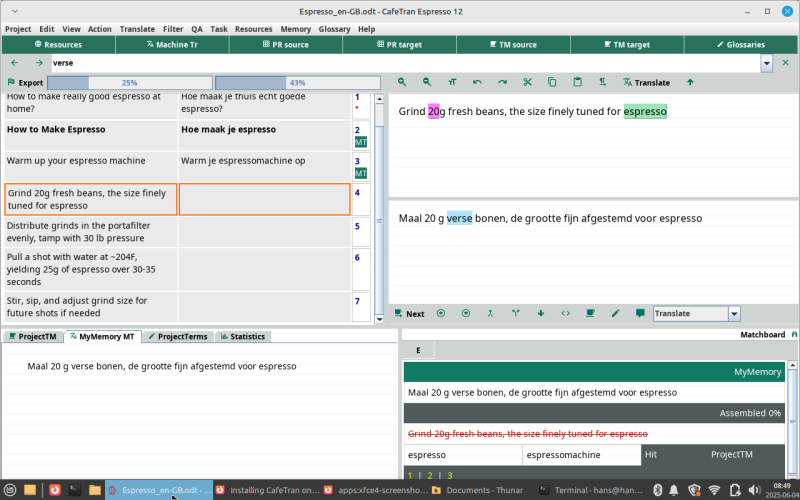
Thank you Piotr. Following your clear instructions I managed to install CafeTran Espresso on a Mid-2009 MacBook with 2 GB RAM and a HDD. Running on Linux Mint XFCE:
| | | | Novian Cahyadi (X)
Local time: 15:14
| How to Install CafeTran Espresso on Linux | Jun 21, 2025 |
I've realized that installing CafeTran Espresso on Linux can be rather puzzling. So, I made this video as a guide to do just that.
https://www.youtube.com/watch?v=PK-fmgHfQdY
I'm using Debian XFCE. But the process should be identical on other distros and desktop environments, except maybe GNOME.
[Edited at 2025-06-21 02:16 GMT]
| | | | Susanne Döring
Jordan
Local time: 10:14
Member (2017)
English to German
+ ...
TOPIC STARTER
Thanks a lot, I will check this out. Should be a good help for anybody who also wants to change their OS.
| | | | To report site rules violations or get help, contact a site moderator: You can also contact site staff by submitting a support request » Installing CafeTran on LinuxMint | LinguaCore | AI Translation at Your Fingertips
The underlying LLM technology of LinguaCore offers AI translations of unprecedented quality. Quick and simple. Add a human linguistic review at the end for expert-level quality at a fraction of the cost and time.
More info » |
| | Pastey | Your smart companion app
Pastey is an innovative desktop application that bridges the gap between human expertise and artificial intelligence. With intuitive keyboard shortcuts, Pastey transforms your source text into AI-powered draft translations.
Find out more » |
|
| | | | X Sign in to your ProZ.com account... | | | | | |




 Login to reply/comment

