This site uses cookies.
Some of these cookies are essential to the operation of the site,
while others help to improve your experience by providing insights into how the site is being used.
For more information, please see the ProZ.com privacy policy.
VIA AILooking for an interpreter?
Remoto by ProZ.com connects you with an identity-verified interpreter by video or phone in about 60 seconds — 300+ languages, on demand or booked ahead.
Try Remoto »
Robert Rietvelt Local time: 01:17 Member (2006) Spanish to Dutch + ...
Oct 25, 2023
A client of mine wants me to do an alignment job. The last time I did that was with good old Trados 8, so ages ago.
I am working now with Studio 2019, and I assumed that it had an alignment function somewhere, only I can't find it.
My question is, does Studio have an alignment function/tool? If yes, where is it hidden? If no, what is the next step? (other than refusing the job)
[Edited at 2023-10-25 15:56 GMT]
Subject:
Comment:
The contents of this post will automatically be included in the ticket generated. Please add any additional comments or explanation (optional)
Samuel Murray Netherlands Local time: 01:17 Member (2006) English to Afrikaans + ...
Trados 2022
Oct 25, 2023
Robert Rietvelt wrote:
My question is, does Studio have an alignment function/tool? If yes, where is it hidden?
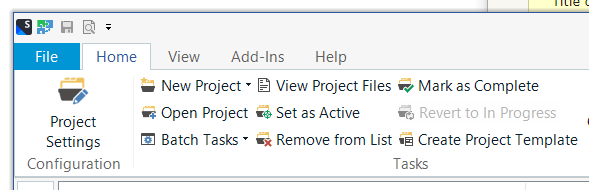
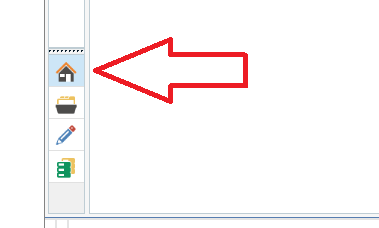
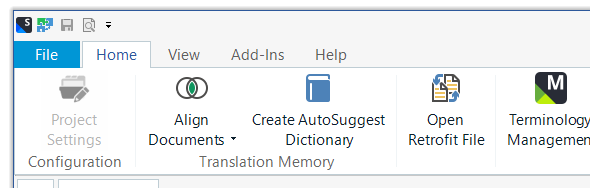
In Trados 2022 it's hidden away very well, but here's how you get to it. In the left-hand icon bar, click the Home icon. The entire ribbon then changes, and the "Align Documents" button appears, as if by magic. Trados' UI was designed on a Friday afternoon, as you can tell.
The aligner works in pretty much the same way as on Trados 2007. YouTube is your friend:
Curiously, the video doesn't tell the viewer HOW to get to that ribbon, which is step 1 in the process. The video just starts off with the appropriate ribbon already visible.
Elena Feriani
Subject:
Comment:
The contents of this post will automatically be included in the ticket generated. Please add any additional comments or explanation (optional)
Robert Rietvelt Local time: 01:17 Member (2006) Spanish to Dutch + ...
TOPIC STARTER
@Samuel
Oct 26, 2023
Found it!
Thanx
Subject:
Comment:
The contents of this post will automatically be included in the ticket generated. Please add any additional comments or explanation (optional)
Lieven Malaise Belgium Local time: 01:17 Member (2020) French to Dutch + ...
Hidden?
Oct 26, 2023
In Studio 2019 you can find it right away at the top of the welcome page. It's not hidden at all.
expressisverbis
Sebastian Witte
Subject:
Comment:
The contents of this post will automatically be included in the ticket generated. Please add any additional comments or explanation (optional)
Check translations faster for consistency, quality and style guide compliance
PerfectIt helps professional translators deliver error-free documents in Microsoft Word and PowerPoint. It helps improve consistency, ensure quality, and enforce style guides. ProZ members receive a 30% discount off individual purchases of PerfectIt.
Edit Translations Faster With Affordable AI You Can Trust
Draftsmith is an affordable AI editing tool for busy translators. It works directly in Microsoft Word, supporting the way you work
ProZ members receive a 20% discount on a single user subscription of Draftsmith.